From the studio
Practice Studio: Using Technology to Spend More Time Playing Bass
Practice Studio grew out of a simple idea: if Song Catalog Manager could help me remember how I recorded a song, why couldn’t it also help me get ready to record one?
One of the unexpected parts of the Professor Plays Bass project has been how much the technology around playing bass has grown alongside the playing itself.
Song Catalog Manager gave me a place to preserve the songs I had recorded, the basses and strings I used, and the recording choices I wanted to remember later.
But there was an obvious gap.
Everything happened after the recording.
There is quite a bit that happens before that.
As my son and I continued working together on the application, Practice Studio became the obvious next module to build.
The messy part before the recording
Learning a song tends to scatter information everywhere.
There might be a YouTube lesson in one tab, a PDF score somewhere else, an MP3 backing track, tuning notes, a metronome app, practice recordings, and eventually a Logic Pro project.
That works.
But I also live in two houses, so “Where did I put that file?” can occasionally become a question involving more than one state.
Practice Studio was our attempt to give the learning side of Professor Plays Bass the same kind of home that Song Catalog Manager had already given the finished recordings.
The goal wasn't to build technology for technology's sake.
The goal was to make it easier to sit down and play bass.
I now have six completed recordings archived in Practice Studio and another three songs actively working their way through it. That's been enough real-world use to change the way I learn.
The complicated part happens behind the button. The useful part happens on the music stand.
My music stand has a web browser now
The device I use most often with Practice Studio isn't my desktop.
It's my tablet.
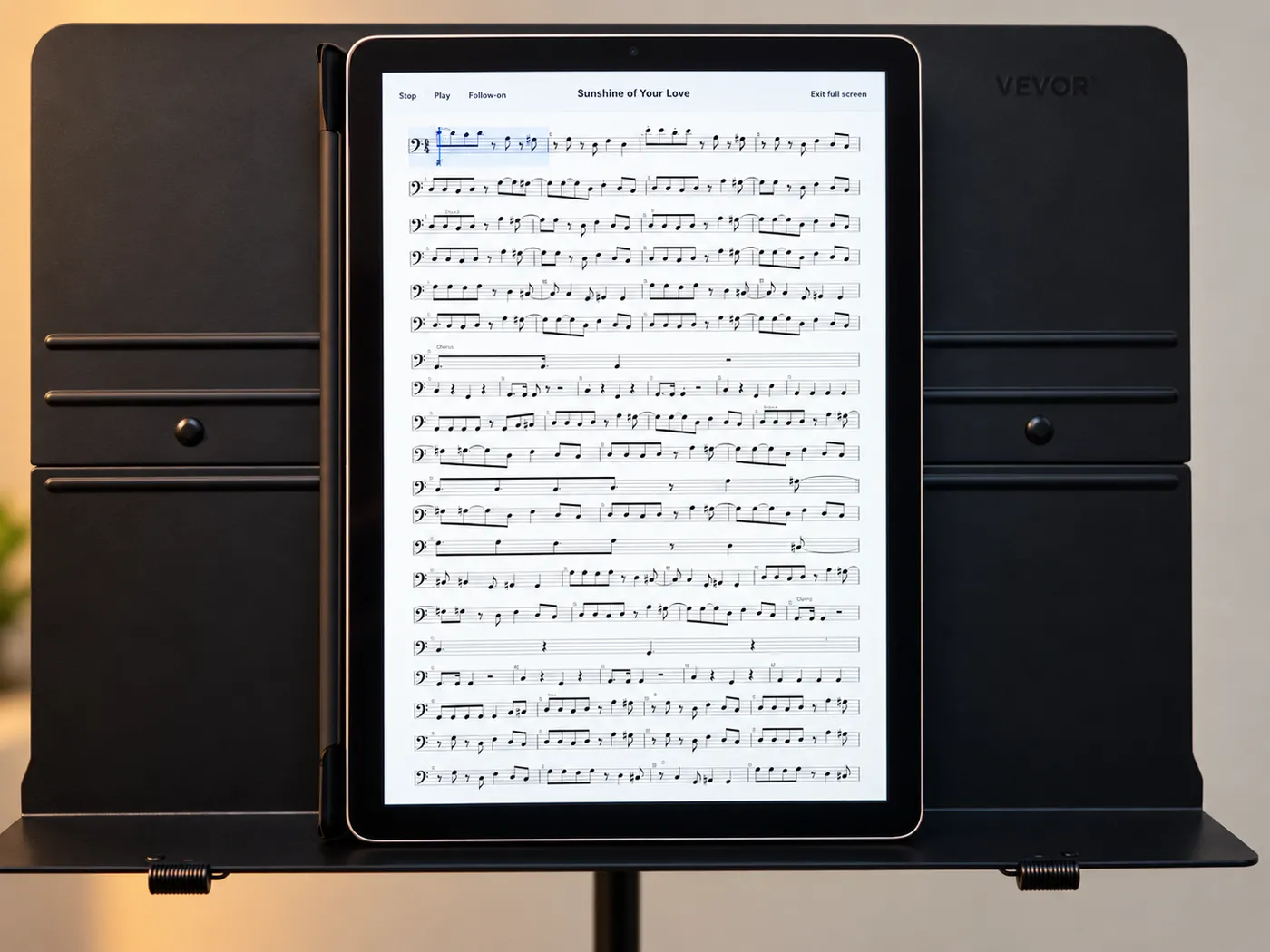
I put it on a music stand, open the song's Practice workspace, and get to the score, video, and rehearsal audio from one place.
But simply storing those things together isn't the interesting part.
What matters is what Practice Studio can do with them.
A good example starts with YouTube.
I attach a YouTube reference video of a song I want to learn and I can use Export audio to turn that video's audio into a rehearsal source. Practice Studio then separates it into stems automatically.
That gives me something I used to spend much more effort creating: a bass-free backing track.
Instead of practicing along with the original video, I can remove the original bass and put myself in that space. If I want to focus almost entirely on rhythm, I can practice against the isolated drums or even a metronome. I can also go back to the full mix or work with a click.
And when I'm ready to move into Logic Pro, I can download the full mix and generated WAV stems and use the same rehearsal material there.
That workflow has become one of my favorite parts of Practice Studio.
Find the source. Export the audio. Remove the bass. Play the bass.
The complicated part happens behind the button.
The useful part happens on the music stand.
Turning a piece of paper into a rehearsal tool
The score has gone through a similar transformation.
A PDF is perfectly useful when all I need to do is read it. Practice Studio has a full-screen PDF reader because sometimes that's exactly what I want.
But a PDF doesn't really know that it's music.
With Transcribe score, I can upload a notation PDF and use a generative AI-assisted transcription workflow to convert it into MusicXML. Once I’ve reviewed and activated the result, the score becomes something I can interact with rather than simply look at.
The MusicXML score can display standard notation, tablature, or both. More importantly for me, playback follows the score with an active cursor — essentially my own version of following the bouncing ball.
When I'm trying to keep my eyes on the notation while also remembering what my hands are supposed to be doing, having the score automatically scroll and visibly show me where we are is remarkably helpful.
I can start and stop playback, jump back when I lose the phrase, slow things down, and repeat the section that's giving me trouble without continually hunting for my place on the page.
And because the score can be aligned with the rehearsal audio, the two parts come together: the notation knows where I am, and the backing track is playing the music I'm actually trying to learn.
That's when the tablet starts feeling less like a screen displaying sheet music and more like a practice tool.
Practice Studio doesn't learn the song for me—it removes the friction around learning it, so I can spend more time doing the part technology can't do: picking up the bass and playing it again.
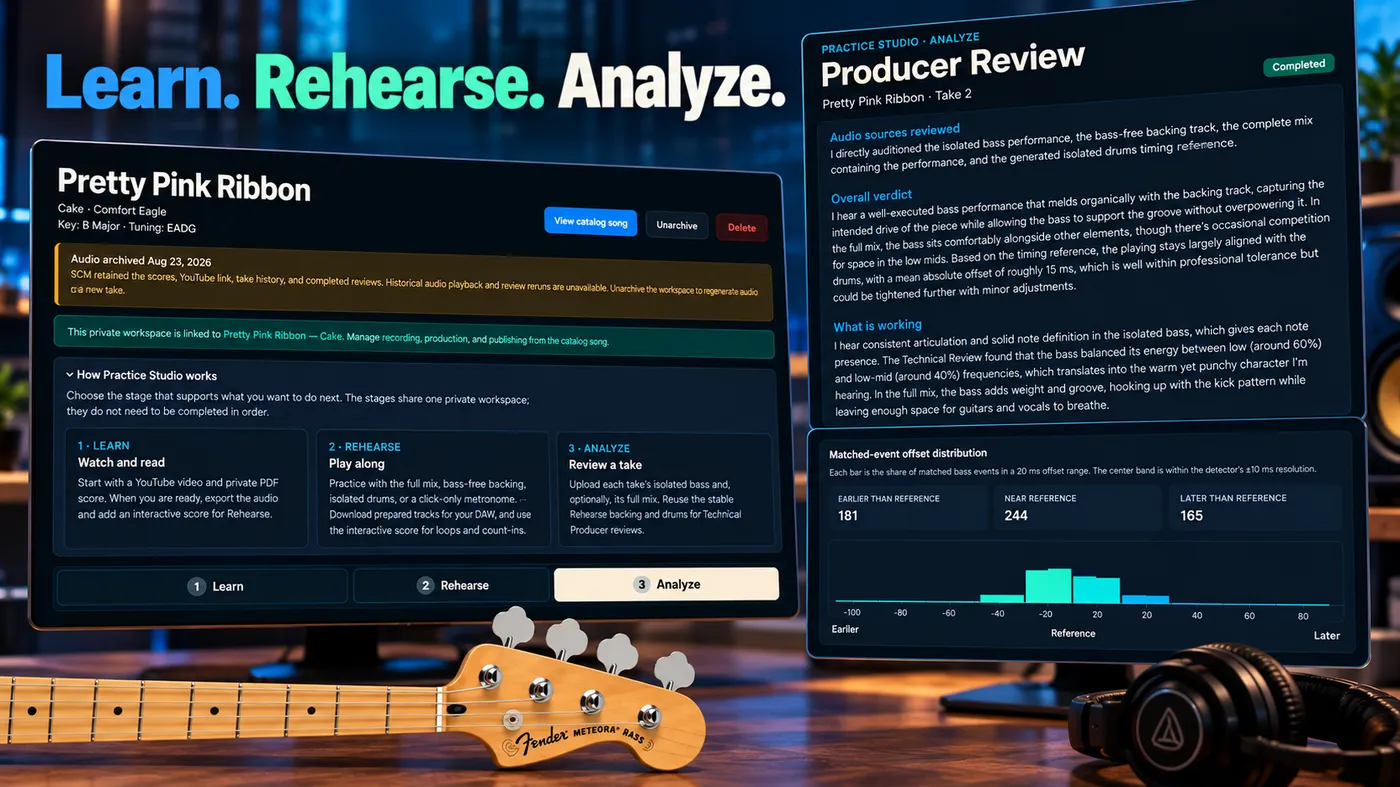
Learn. Rehearse. Analyze.
We divided Practice Studio into three main stages: Learn, Rehearse, and Analyze.
They sound sequential, but I don't really use them that way.
I'll spend time in Learn, move into Rehearse, discover that something isn't quite right, and go straight back to the score. I may slow a section down, loop it, work against the drums, and then return to the full backing track.
Once I think I've got the part reasonably under control, I can record a take and move into Analyze.
That's where another useful distinction appears: how a performance feels while I'm playing it versus what actually happened.
A take can feel great in the moment and reveal something different when I listen back.
Practice Studio can run a technical review using the same reference material I've been rehearsing with, giving me another source of information about timing, consistency, dynamics, and tone. I can then optionally request a generative AI-assisted Producer Review, which uses the performance and technical evidence to provide a more subjective perspective on pocket, dynamics, tone, and how the bass fits the music.
But the point isn't to turn playing music into a spreadsheet of scores.
The measurements give me clues about where to listen.
Then I go back and listen.
And, usually, play it again.
The computer can sometimes tell me that something happened, and even help me find where it happened.
I still have to decide whether it was musical.
Asking Copilot how it would approach the recording
More recently, Practice Studio has also become connected — carefully — to the Copilot we've been building into Song Catalog Manager.
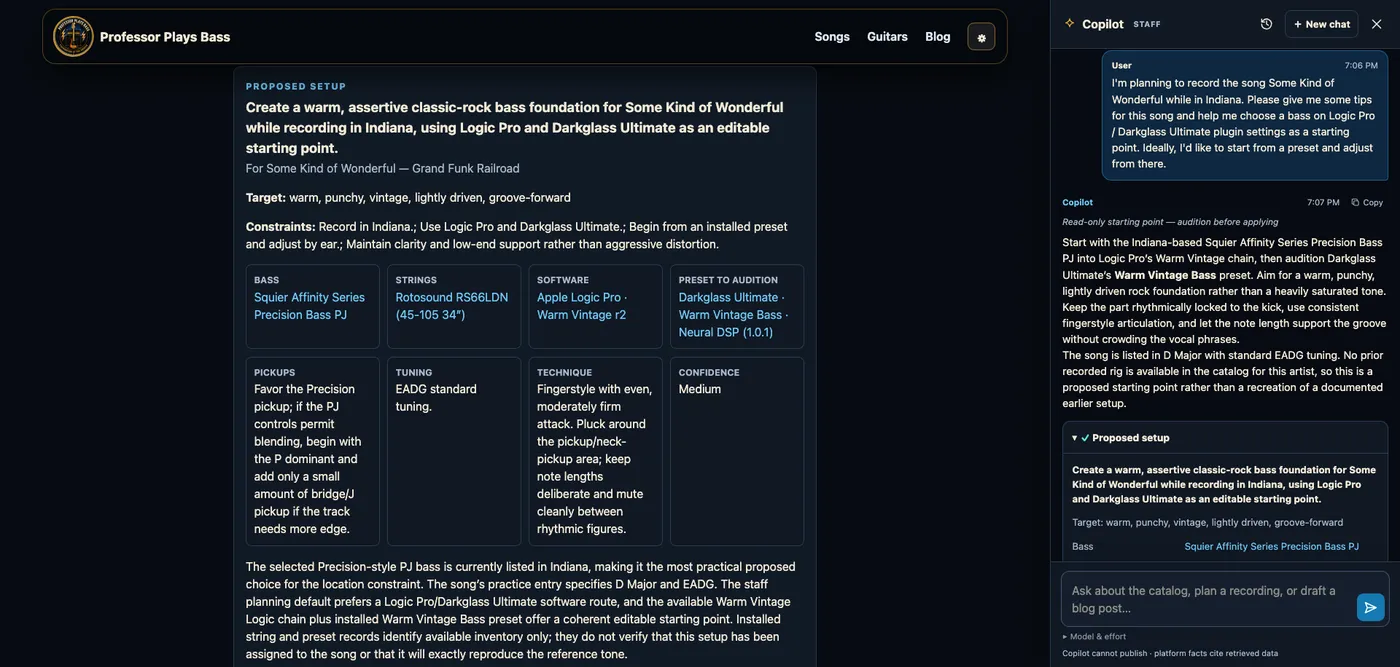
One thing I've been experimenting with is asking Copilot to create a recording plan for a song I'm preparing.
It can look at the song, the basses and strings I currently have available, previous recording setups, and the effects and software I've cataloged. From that, it can suggest a starting point for the eventual session.
For one of the songs currently in Practice Studio, it produced a plan with a bass choice, pickup approach, tuning, playing technique, and Darkglass/Logic starting point, along with alternatives to audition.
I deliberately call it a starting point.
I don't want an AI choosing my bass tone.
That's part of the fun.
What I want is something that can look through the information I've accumulated and say, essentially, “Based on what you've told me, here's where I'd start.”
Then I plug in the bass.
Once I'm actually recording, personal preference wins. I may change the pickup blend, remove the drive, add more mids, pick a different bass, or decide that the technically “better” option simply isn't the sound I want.
The recording plan isn't an instruction sheet.
It's another informed opinion in the room.
And the boundary is intentional: Copilot can help with planning, but it doesn't get to start changing scores, takes, audio, or other parts of the Practice workspace.
A suggestion should remain a suggestion.
Technology in service of something decidedly non-technical
There is a funny contradiction at the center of Practice Studio.
It is probably one of the more technically complicated things my son and I have added to Professor Plays Bass.
And its purpose is to make my interaction with technology less complicated.
When I put the tablet on the music stand, I don't care about the software architecture behind the score reader or how the backing track was prepared.
I want to find measure 37, slow it down, loop it, and figure out why my fingers keep disagreeing with it.
When I record a practice take, I don't want another directory full of final_take_2_really_final.wav files. I want the take associated with the song so I can come back to it later.
And when I finally record something I'm happy with, the finished recording can move into Song Catalog Manager while the practice material stays backstage.
That's the part of Practice Studio that has probably worked best for me.
It gives the unfinished work somewhere to live.
Building the tool while learning the craft
Working on Practice Studio with my son has made this a slightly different kind of software project for me.
I've spent a career building technology to solve technical and operational problems.
This time, we're applying some of those same instincts to something at which I am still very much a student.
Bass isn't an engineering problem to solve.
There isn't an optimal algorithm that produces a great groove.
But there are repetitive little obstacles around learning: finding material, keeping it organized, creating useful backing tracks, practicing difficult sections, remembering previous choices, and figuring out how I want to record the song.
Those are problems technology can help remove.
And every one we remove gives me a little more time for the part it can't do for me.
Putting the tablet on the music stand.
Picking up the bass.
And playing it again.
Join the conversation
Comments
No comments yet. Start the conversation.